

Effective Skeleton Loader in Flutter
July 11, 2021
Designing Youtube’s Skeleton Loader in Flutter
Hey People! Welcome to another short story. In this story, I will demonstrate how to design and program a Skeleton Loader like YouTube’s website using Google’s Flutter Framework.
The end result will look something like this —
So let’s start!
What is a Skeleton Loader?
Basically, a skeleton loader is a placeholder for information that is still loading, which helps the user focus on progress rather than waiting, and helps with a smooth transition from loading to the final page UI.
For inspiration and reference, I googled some images of Skeleton Loaders and found this simple gif image.
A great example of a website using skeleton loaders very effectively is https://rarible.com

With the help of this gif, let me break down the steps to create these loaders for you.
Algo for creating Skeleton Loaders
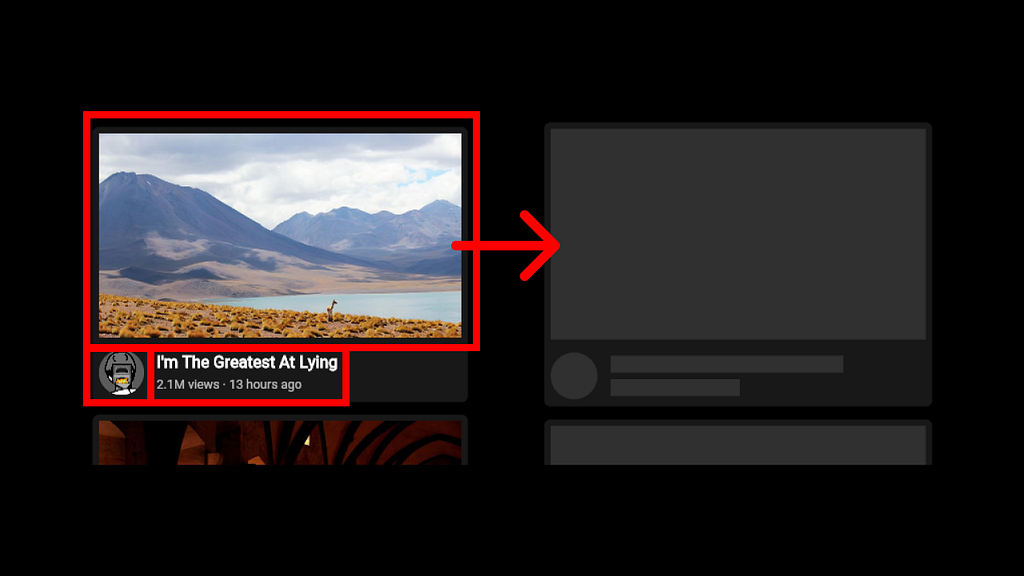
- First, break your UI/Frontend into simple shapes. For example, texts to simple rectangles, buttons & images to big rectangles, avatars to circles or squares, etc.
An example can be seen in the image below.

- Then layout these shape components exactly like your frontend.
Try to match the final design as much as possible as this will result in a smoother transition. - The next and final step is to animate the colour of these shapes so that they look like they are glowing or breathing!
We can use these steps to generate a skeleton loader for any project.
Now that we know how to design a skeleton loader, let’s see how to code it in Flutter!
Let’s Code
Finally, let’s begin coding this design in Flutter & Dart.
I have developed this project in CodePen so that you can use it as a reference.
CodePen Link — https://codepen.io/LiquidatorCoder/pen/wvGbRgp
Create a Flutter Project
Let’s first start with creating a Flutter project. As I was doing this on CodePen I didn’t need to create a project from scratch.
Initial code —
import 'package:flutter/material.dart';
void main() {
    runApp(
        MaterialApp(
            home: MyApp(),
            debugShowCheckedModeBanner: false,
        ),
    );
}
class MyApp extends StatefulWidget {
@override
State<StatefulWidget> createState() {
return _MyAppState();
}
}class _MyAppState extends State<MyApp> {
@override
Widget build(BuildContext context) {
return Scaffold(
backgroundColor: Colors.black,
body: Container(),
);
}
}Add some data you need to load
Now let’s add some dummy data and the Youtube video cards which represent the data that is going to be loaded.
For faking loading I have added a FutureBuilder with a future that is delayed for 4 seconds before it returns some data.
This part of the code is there just to create a normal app environment.
P.S. — For the sake of brevity I have only kept code changes here. For complete code visit CodePen.
Code —
class MyApp extends StatefulWidget {
    @override
    State<StatefulWidget> createState() {
        return _MyAppState();
    }
}// Add code for Future & FutureBuilder
class _MyAppState extends State<MyApp> {
Future<bool> getVideo() async {
await Future.delayed(
Duration(seconds: 4),
).then((value) => true);
}
    @override
    Widget build(BuildContext context) {
        return Scaffold(
            backgroundColor: Colors.black,
            body: Center(
                child: Scrollbar(
                    child: ListView.builder(
                        padding: EdgeInsets.all(5),
                        itemCount: 4,
                        shrinkWrap: true,
                        itemBuilder: (context, index) {
                            return FutureBuilder(
                                builder: (context, snapshot) {
                                    return Video(index: index);
                                },
                                future: getVideo(),
                            );
                        },
                    ),
                ),
            ),
        );
    }
}
// Add video card widget along with data
class Video extends StatelessWidget {
  final int index;
  Video({@required this.index});
final String avatar =
      "https://yt3.ggpht.com/a/AATXAJwTuzNgKRSLVIOcVTVGGr_xFKgo8LFSQF163hCKSQ=s176-c-k-c0x00ffffff-no-rj";
  final Map videoData = {
    "url": [
      "https://picsum.photos/seed/a/800/450",
      "https://picsum.photos/seed/b/800/450",
      "https://picsum.photos/seed/c/800/450",
      "https://picsum.photos/seed/d/800/450",
    ],
    "title": [
      "I'm The Greatest At Lying",
      "Ending the Drama",
      "Among Us But I RAGE QUIT #4",
      "You Laugh You Donate",
    ],
    "data": [
      "2.1M views · 13 hours ago",
      "3.6M views · 1 day ago",
      "5.3M views · 5 days ago",
      "5.1M views · 6 days ago",
    ],
  };
  @override
  Widget build(BuildContext context) {
    return Padding(
      padding: EdgeInsets.all(5),
      child: Center(
        child: Container(
          decoration: BoxDecoration(
            borderRadius: BorderRadius.circular(5),
            color: const Color(0xFF181818),
          ),
          width: MediaQuery.of(context).size.width < 300
              ? MediaQuery.of(context).size.width - 20
              : 300,
          height: MediaQuery.of(context).size.width < 300
              ? MediaQuery.of(context).size.width * 220 / 300
              : 220,
          child: Column(
            children: [
              MediaQuery.of(context).size.width < 300
                  ? AspectRatio(
                      aspectRatio: 16 / 9,
                      child: Container(
                        margin: EdgeInsets.all(5),
                        child: Image.network(videoData["url"][index]),
                      ),
                    )
                  : Container(
                      margin: EdgeInsets.all(5),
                      height: 163.125,
                      width: 290,
                      child: Image.network(videoData["url"][index]),
                    ),
              Row(
                children: [
                  Container(
                    margin: EdgeInsets.all(5),
                    decoration: BoxDecoration(
                        borderRadius: BorderRadius.circular(500),
                        image: DecorationImage(image: NetworkImage(avatar))),
                    height: 36.25,
                    width: 36.25,
                  ),
                  Column(
                    crossAxisAlignment: CrossAxisAlignment.start,
                    children: [
                      Container(
                        margin: EdgeInsets.fromLTRB(5, 0, 5, 5),
                        width: MediaQuery.of(context).size.width < 300
                            ? MediaQuery.of(context).size.width - 80
                            : 240,
                        child: Text(
                          videoData["title"][index],
                          overflow: TextOverflow.ellipsis,
                          style: TextStyle(
                            color: Colors.white,
                            fontWeight: FontWeight.w600,
                            fontSize: 13,
                          ),
                        ),
                      ),
                      Container(
                        margin: EdgeInsets.fromLTRB(5, 0, 5, 0),
                        width: MediaQuery.of(context).size.width < 300
                            ? MediaQuery.of(context).size.width - 80
                            : 240,
                        child: Text(
                          videoData["data"][index],
                          overflow: TextOverflow.ellipsis,
                          style: TextStyle(
                            color: Colors.white70,
                            fontWeight: FontWeight.w100,
                            fontSize: 10,
                          ),
                        ),
                      ),
                    ],
                  )
                ],
              )
            ],
          ),
        ),
      ),
    );
  }
}
Finally, create a loader
For this first create a stateful widget with SingleTickerProviderStateMixin class so that we can add an animation controller in this widget.
Now initialise this controller with a color tween animation which will repeat to create a breathing effect.
class Loader extends StatefulWidget {
  @override
  State<StatefulWidget> createState() {
    return _LoaderState();
  }
}
class _LoaderState extends State<Loader> with SingleTickerProviderStateMixin {
AnimationController _controller;
Animation<Color> animation;@override
void initState() {
super.initState();
_controller = AnimationController(
duration: const Duration(milliseconds: 800),
vsync: this,
);
animation = TweenSequence<Color>(
[
TweenSequenceItem(
weight: 1.0,
tween: ColorTween(
begin: Colors.white10,
end: Color(0x22FFFFFF),
),
),
TweenSequenceItem(
weight: 1.0,
tween: ColorTween(
begin: Color(0x22FFFFFF),
end: Colors.white10,
),
),
],
).animate(_controller)
..addListener(() {
setState(() {});
});
_controller.repeat();
}
@override
  dispose() {
    _controller.dispose();
    super.dispose();
  }
@override
  Widget build(BuildContext context) {
    return Container();
  }
}
Now let’s break the UI into simpler shapes and layout these in this widget.
Code —
@override
  Widget build(BuildContext context) {
    return Padding(
      padding: EdgeInsets.all(5),
      child: Center(
        child: Container(
          decoration: BoxDecoration(
            borderRadius: BorderRadius.circular(5),
            color: const Color(0xFF181818),
          ),
          width: MediaQuery.of(context).size.width < 300
              ? MediaQuery.of(context).size.width
              : 300,
          height: MediaQuery.of(context).size.width < 300
              ? MediaQuery.of(context).size.width * 220 / 300
              : 220,
          child: Column(
            children: [
              MediaQuery.of(context).size.width < 300
                  ? AspectRatio(
                      aspectRatio: 16 / 9,
                      child: Container(
                        margin: EdgeInsets.all(5),
                        color: const Color(0xFF181818),
                      ),
                    )
                  : Container(
                      margin: EdgeInsets.all(5),
                      color: const Color(0xFF181818),
                      height: 163.125,
                      width: 290,
                    ),
              Row(
                children: [
                  Container(
                    margin: EdgeInsets.all(5),
                    decoration: BoxDecoration(
                        borderRadius: BorderRadius.circular(500),
                        color: const Color(0xFF181818)),
                    height: 36.25,
                    width: 36.25,
                  ),
                  Column(
                    crossAxisAlignment: CrossAxisAlignment.start,
                    children: [
                      Container(
                        margin: EdgeInsets.fromLTRB(5, 5, 5, 5),
                        height: 13.125,
                        width: 180,
                        color: const Color(0xFF181818),
                      ),
                      Container(
                        margin: EdgeInsets.fromLTRB(5, 0, 5, 5),
                        height: 13.125,
                        width: 100,
                        color: const Color(0xFF181818),
                      ),
                    ],
                  )
                ],
              )
            ],
          ),
        ),
      ),
    );
  }
Finally, add animation.value as color property of these Containers.
Complete code —
import 'package:flutter/material.dart';
void main() {
  runApp(
    MaterialApp(
      home: MyApp(),
      debugShowCheckedModeBanner: false,
    ),
  );
}
class MyApp extends StatefulWidget {
@override
State<StatefulWidget> createState() {
return _MyAppState();
}
}class _MyAppState extends State<MyApp> {
Future<bool> getVideo() async {
await Future.delayed(
Duration(seconds: 4),
).then((value) => true);
}@override
Widget build(BuildContext context) {
return Scaffold(
backgroundColor: Colors.black,
body: Center(
child: Scrollbar(
child: ListView.builder(
padding: EdgeInsets.all(5),
itemCount: 4,
shrinkWrap: true,
itemBuilder: (context, index) {
return FutureBuilder(
builder: (context, snapshot) {
if (snapshot.connectionState != ConnectionState.done) {
return Loader();
}
return Video(index: index);
},
future: Future.delayed(Duration(seconds: 3)),
);
},
),
),
),
);
}
}
class Video extends StatelessWidget {
  final int index;
  Video({@required this.index});
final String avatar =
"https://yt3.ggpht.com/a/AATXAJwTuzNgKRSLVIOcVTVGGr_xFKgo8LFSQF163hCKSQ=s176-c-k-c0x00ffffff-no-rj";
final Map videoData = {
"url": [
"https://picsum.photos/seed/a/800/450",
"https://picsum.photos/seed/b/800/450",
"https://picsum.photos/seed/c/800/450",
"https://picsum.photos/seed/d/800/450",
],
"title": [
"I'm The Greatest At Lying",
"Ending the Drama",
"Among Us But I RAGE QUIT #4",
"You Laugh You Donate",
],
"data": [
"2.1M views · 13 hours ago",
"3.6M views · 1 day ago",
"5.3M views · 5 days ago",
"5.1M views · 6 days ago",
],
};
@override
Widget build(BuildContext context) {
return Padding(
padding: EdgeInsets.all(5),
child: Center(
child: Container(
decoration: BoxDecoration(
borderRadius: BorderRadius.circular(5),
color: const Color(0xFF181818),
),
width: MediaQuery.of(context).size.width < 300
? MediaQuery.of(context).size.width - 20
: 300,
height: MediaQuery.of(context).size.width < 300
? MediaQuery.of(context).size.width * 220 / 300
: 220,
child: Column(
children: [
MediaQuery.of(context).size.width < 300
? AspectRatio(
aspectRatio: 16 / 9,
child: Container(
margin: EdgeInsets.all(5),
child: Image.network(videoData["url"][index]),
),
)
: Container(
margin: EdgeInsets.all(5),
height: 163.125,
width: 290,
child: Image.network(videoData["url"][index]),
),
Row(
children: [
Container(
margin: EdgeInsets.all(5),
decoration: BoxDecoration(
borderRadius: BorderRadius.circular(500),
image: DecorationImage(image: NetworkImage(avatar))),
height: 36.25,
width: 36.25,
),
Column(
crossAxisAlignment: CrossAxisAlignment.start,
children: [
Container(
margin: EdgeInsets.fromLTRB(5, 0, 5, 5),
width: MediaQuery.of(context).size.width < 300
? MediaQuery.of(context).size.width - 80
: 240,
child: Text(
videoData["title"][index],
overflow: TextOverflow.ellipsis,
style: TextStyle(
color: Colors.white,
fontWeight: FontWeight.w600,
fontSize: 13,
),
),
),
Container(
margin: EdgeInsets.fromLTRB(5, 0, 5, 0),
width: MediaQuery.of(context).size.width < 300
? MediaQuery.of(context).size.width - 80
: 240,
child: Text(
videoData["data"][index],
overflow: TextOverflow.ellipsis,
style: TextStyle(
color: Colors.white70,
fontWeight: FontWeight.w100,
fontSize: 10,
),
),
),
],
)
],
)
],
),
),
),
);
}
}
class Loader extends StatefulWidget {
  @override
  State<StatefulWidget> createState() {
    return _LoaderState();
  }
}
class _LoaderState extends State<Loader> with SingleTickerProviderStateMixin {
AnimationController _controller;
Animation<Color> animation;@override
void initState() {
super.initState();
_controller = AnimationController(
duration: const Duration(milliseconds: 800),
vsync: this,
);
animation = TweenSequence<Color>(
[
TweenSequenceItem(
weight: 1.0,
tween: ColorTween(
begin: Colors.white10,
end: Color(0x22FFFFFF),
),
),
TweenSequenceItem(
weight: 1.0,
tween: ColorTween(
begin: Color(0x22FFFFFF),
end: Colors.white10,
),
),
],
).animate(_controller)
..addListener(() {
setState(() {});
});
_controller.repeat();
}
@override
  dispose() {
    _controller.dispose();
    super.dispose();
  }
@override
  Widget build(BuildContext context) {
    return Padding(
      padding: EdgeInsets.all(5),
      child: Center(
        child: Container(
          decoration: BoxDecoration(
            borderRadius: BorderRadius.circular(5),
            color: const Color(0xFF181818),
          ),
          width: MediaQuery.of(context).size.width < 300
              ? MediaQuery.of(context).size.width
              : 300,
          height: MediaQuery.of(context).size.width < 300
              ? MediaQuery.of(context).size.width * 220 / 300
              : 220,
          child: Column(
            children: [
              MediaQuery.of(context).size.width < 300
                  ? AspectRatio(
                      aspectRatio: 16 / 9,
                      child: Container(
                        margin: EdgeInsets.all(5),
                        color: animation.value,
                      ),
                    )
                  : Container(
                      margin: EdgeInsets.all(5),
                      color: animation.value,
                      height: 163.125,
                      width: 290,
                    ),
              Row(
                children: [
                  Container(
                    margin: EdgeInsets.all(5),
                    decoration: BoxDecoration(
                        borderRadius: BorderRadius.circular(500),
                        color: animation.value),
                    height: 36.25,
                    width: 36.25,
                  ),
                  Column(
                    crossAxisAlignment: CrossAxisAlignment.start,
                    children: [
                      Container(
                        margin: EdgeInsets.fromLTRB(5, 5, 5, 5),
                        height: 13.125,
                        width: 180,
                        color: animation.value,
                      ),
                      Container(
                        margin: EdgeInsets.fromLTRB(5, 0, 5, 5),
                        height: 13.125,
                        width: 100,
                        color: animation.value,
                      ),
                    ],
                  )
                ],
              )
            ],
          ),
        ),
      ),
    );
  }
}
Final demo —

That’s it, folks! Thanks for reading my first Flutter article.
Do follow me over at Twitter @LiquidatorAB for more microblogs on Flutter!